Minions
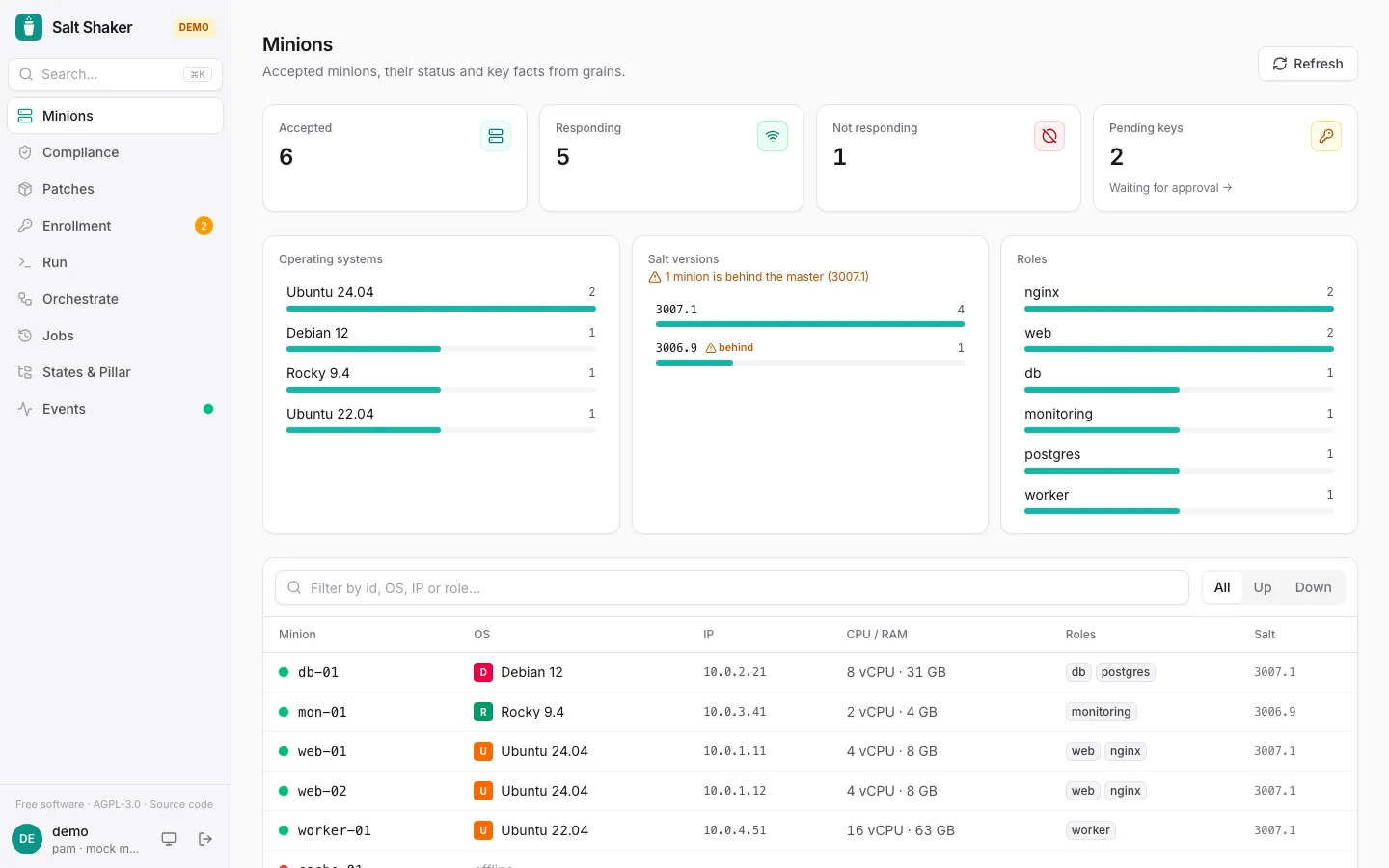
The Minions page shows status, OS, IPs, CPU/RAM and roles of every minion. A fleet breakdown flags minions running an older Salt than the master.
With the server, a Compliance column shows each minion’s result in the latest compliance check it answered: in compliance, drifted or error. It links to that check’s job, and the tooltip says when it ran. Minions that no recent check reached show not checked. Both checks from the Compliance page and dry-run highstates started elsewhere count. An Updates column shows how many package upgrades each minion had in the latest patch scan it answered (pkg.list_upgrades, from the Patches page or a schedule), linked to that scan. A scan that failed on a minion doesn’t count, so its last good result stays. The Drifted filter shows only the minions that drifted or failed in their latest check.
The search, the status filter and the fleet breakdown pick are kept in the page’s address, so they’re still there when you come back from a minion, and you can bookmark or share a filtered list, e.g. /?status=drifted&facet=role:web.
To run something on a handful of minions, tick them in the first column (the header box picks every minion the filter shows) and click Run on selected. The selection stays while you change the search, so you can pick from several, and Run opens with them as a list target. The bar at the bottom says how many are picked and how many the current filter hides.
Large fleets
Section titled “Large fleets”The list comes from the master’s minion data cache (cache.grains), so opening it doesn’t start a job on the minions. Offline minions keep their last known OS and IPs. Which minions respond (manage.status) is filled in once that check finishes. The table shows 100 minions at a time.
With the server, the fleet is cached for 15 seconds and shared by all users. Refresh reads it again. If the master runs with minion_data_cache: False, Salt Shaker falls back to asking the minions directly, which is slower.
To try it without a fleet, open the demo with ?demo=large (606 minions).
Minion details
Section titled “Minion details”Each minion’s page shows its grains and compiled pillar. Viewers don’t see pillar data, since it often holds secrets.
The Jobs tab lists the recorded jobs that targeted the minion, newest first, with how each one ended on that minion: ok, changed, drift (a dry run that would change something), failed or no return. Jobs started from the salt CLI are included. The list covers the job history retention period (JOB_RETENTION_DAYS) and is not available in direct mode.
Offline minions are detected the way the Salt CLI does it, with saltutil.find_job and a short gather_job_timeout.
Press ⌘K / Ctrl+K anywhere to jump to a page, minion, saved target or recent command.